Hello beautiful peoples!

You open Power Options in the Control Panel, dig into Advanced power settings, and find “USB selective suspend setting” with the value “Setting: Disabled”. So, will Windows turn off your USB ports or not? Short answer: no, and that is exactly the problem. “Disabled” does not disable your ports. It disables the feature that would put them to sleep. Welcome to Microsoft naming, where a double negative is a lifestyle.
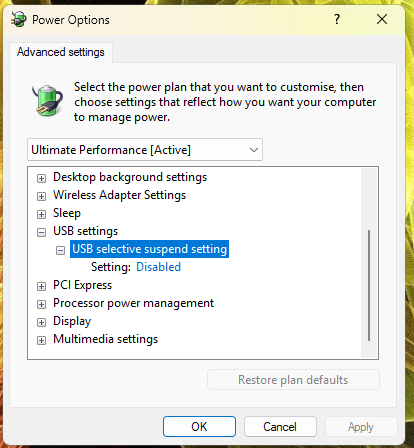
It’s even more confusing… Why is the word SELECTIVE used there? Does it mean that when I enable this option, SOME SELECTED ports will get suspended? Which ones? Who selects them?! Arrrgh…
There is a simple explanation for this. Enabled means that Windows is allowed to suspend idle USB ports to save power. Disabled means that none of the USB ports will be suspended to save power. It’s just the wording that is confusing.
I hope this helps!
Catch you on the flip side,
AndrzejL