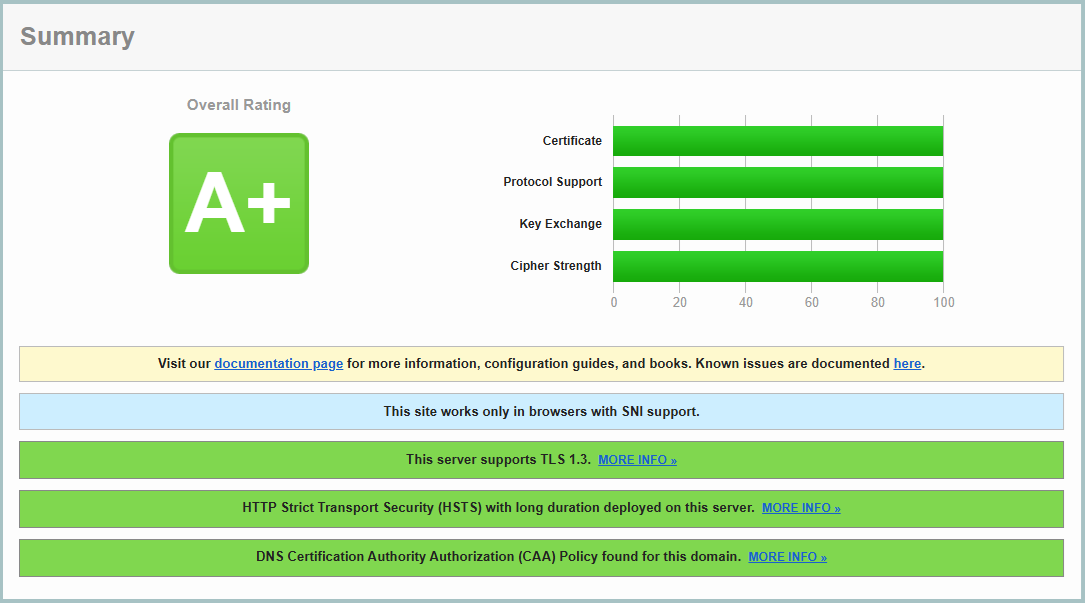
Update 04/05/2026 10:10 AM: I was right for once… Today’s Defender update no longer considers DigiCert root certificates as trojans 😁
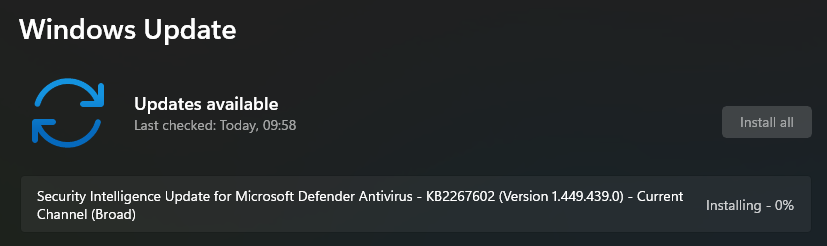
All I had to do is install the update and run quick scan again…
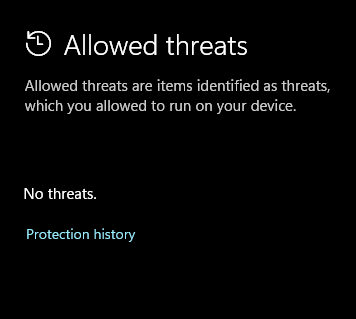
And the “Allowed threats” is now empty again.
Hello beautiful peoples!

So I was using my PC today around 12:00 and have noticed a little exclamation mark on my Windows Security icon  . No biggy – sometimes it just demands to run a quick scan. Indeed that was the case… Few minutes later I was however in a desperate need of a clean pair of pantaloons… All of the sudden little exclamation mark turned into a red dot and I was presented with:
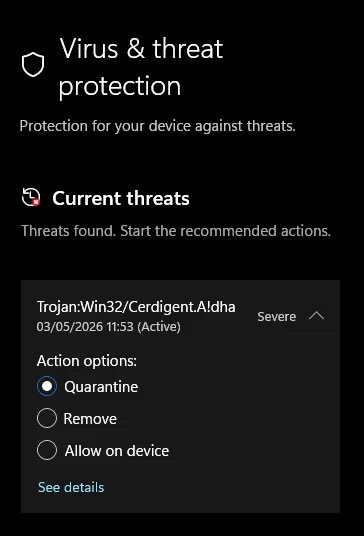
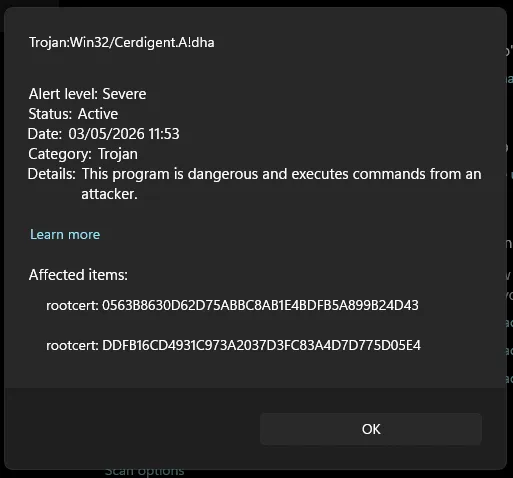
If I censor the words that came out of my mouth at that moment… I was sitting here in complete silence.
The threat was described as targeting root certificates in my system store. Two of them. Root certificates are the backbone of HTTPS trust on Windows – banks, email, VPNs, everything. If those get tampered with, an attacker can silently intercept encrypted traffic.
The alert pointed at two specific items:
rootcert:_0563B8630D62D75ABBC8AB1E4BDFB5A899B24D43rootcert:_DDFB16CD4931C973A2037D3FC83A4D7D775D05E4
Threat severity: Severe. Category: Trojan. Status: Active.
Before clicking anything, I started digging.
I ran PowerShell (as admin) to check whether those certificates were actually in my root store and what they looked like:
# Check if the malicious certs are in the system store
Get-ChildItem Cert:\LocalMachine\Root | Where-Object { $_.Thumbprint -in "0563B8630D62D75ABBC8AB1E4BDFB5A899B24D43","DDFB16CD4931C973A2037D3FC83A4D7D775D05E4" }

# Microsoft Windows Defender History in the last 24 hours
Get-MpThreatDetection | Select-Object ThreatID, ThreatName, ActionSuccess, InitialDetectionTime, Resources | Sort-Object InitialDetectionTime -Descending | Select-Object -First 10

# Which process caused it
Get-WinEvent -LogName "Microsoft-Windows-Windows Defender/Operational" -MaxEvents 50 | Where-Object {$_.Message -like "*Cerdigent*"} | Select-Object TimeCreated, Message | Format-List
Windows PowerShell
Copyright (C) Microsoft Corporation. All rights reserved.
Install the latest PowerShell for new features and improvements! https://aka.ms/PSWindows
PS C:\WINDOWS\system32> Get-WinEvent -LogName "Microsoft-Windows-Windows Defender/Operational" -MaxEvents 50 | Where-Object {$_.Message -like "*Cerdigent*"} | Select-Object TimeCreated, Message | Format-List
>> # Which process caused it
>>
>> Get-MpThreatDetection | Select-Object ThreatID, ThreatName, ActionSuccess, InitialDetectionTime, Resources | Sort-Object InitialDetectionTime -Descending | Select-Object -First 10
>> # Microsoft Windows Defender History in the last 24 hours
>>
>> Get-ChildItem Cert:\LocalMachine\Root | Where-Object { $_.Thumbprint -in "0563B8630D62D75ABBC8AB1E4BDFB5A899B24D43","DDFB16CD4931C973A2037D3FC83A4D7D775D05E4" }
>> # Check if the malicious certs are in the store
TimeCreated : 03/05/2026 11:53:57
Message : Microsoft Defender Antivirus has detected malware or other potentially unwanted software.
For more information please see the following:
https://go.microsoft.com/fwlink/?linkid=37020&name=Trojan:Win32/Cerdigent.A!dha&threatid=2147968144&enter
prise=0
Name: Trojan:Win32/Cerdigent.A!dha
ID: 2147968144
Severity: Severe
Category: Trojan
Path: rootcert:_0563B8630D62D75ABBC8AB1E4BDFB5A899B24D43;
rootcert:_DDFB16CD4931C973A2037D3FC83A4D7D775D05E4
Detection Origin: Unknown
Detection Type: Concrete
Detection Source: User
User: OptiPlex-7010\Andrz
Process Name: Unknown
Security intelligence Version: AV: 1.449.424.0, AS: 1.449.424.0, NIS: 1.449.424.0
Engine Version: AM: 1.1.26030.3008, NIS: 1.1.26030.3008
ThreatID : 2147968144
ThreatName :
ActionSuccess : True
InitialDetectionTime : 03/05/2026 11:53:57
Resources : {rootcert:_0563B8630D62D75ABBC8AB1E4BDFB5A899B24D43,
rootcert:_DDFB16CD4931C973A2037D3FC83A4D7D775D05E4}
PSPath : [Microsoft.PowerShell.Security](http://Microsoft.PowerShell.Security)\Certificate::LocalMachine\Root\DDFB16CD4931C973A2037D3FC83A4D7
D775D05E4
PSParentPath : [Microsoft.PowerShell.Security](http://Microsoft.PowerShell.Security)\Certificate::LocalMachine\Root
PSChildName : DDFB16CD4931C973A2037D3FC83A4D7D775D05E4
PSDrive : Cert
PSProvider : [Microsoft.PowerShell.Security](http://Microsoft.PowerShell.Security)\Certificate
PSIsContainer : False
EnhancedKeyUsageList : {Client Authentication (1.3.6.1.5.5.7.3.2), Code Signing (1.3.6.1.5.5.7.3.3), Secure Email
(1.3.6.1.5.5.7.3.4), Server Authentication (1.3.6.1.5.5.7.3.1)...}
DnsNameList : {DigiCert Trusted Root G4}
SendAsTrustedIssuer : False
EnrollmentPolicyEndPoint : Microsoft.CertificateServices.Commands.EnrollmentEndPointProperty
EnrollmentServerEndPoint : Microsoft.CertificateServices.Commands.EnrollmentEndPointProperty
PolicyId :
Archived : False
Extensions : {[System.Security](http://System.Security).Cryptography.Oid, [System.Security](http://System.Security).Cryptography.Oid,
[System.Security](http://System.Security).Cryptography.Oid}
FriendlyName : DigiCert Trusted Root G4
IssuerName : [System.Security](http://System.Security).Cryptography.X509Certificates.X500DistinguishedName
NotAfter : 15/01/2038 12:00:00
NotBefore : 01/08/2013 13:00:00
HasPrivateKey : False
PrivateKey :
PublicKey : [System.Security](http://System.Security).Cryptography.X509Certificates.PublicKey
RawData : {48, 130, 5, 144...}
SerialNumber : 059B1B579E8E2132E23907BDA777755C
SubjectName : [System.Security](http://System.Security).Cryptography.X509Certificates.X500DistinguishedName
SignatureAlgorithm : [System.Security](http://System.Security).Cryptography.Oid
Thumbprint : DDFB16CD4931C973A2037D3FC83A4D7D775D05E4
Version : 3
Handle : 1741044031392
Issuer : CN=DigiCert Trusted Root G4, OU=[www.digicert.com](http://www.digicert.com), O=DigiCert Inc, C=US
Subject : CN=DigiCert Trusted Root G4, OU=[www.digicert.com](http://www.digicert.com), O=DigiCert Inc, C=US
PSPath : [Microsoft.PowerShell.Security](http://Microsoft.PowerShell.Security)\Certificate::LocalMachine\Root\0563B8630D62D75ABBC8AB1E4BDFB5A
899B24D43
PSParentPath : [Microsoft.PowerShell.Security](http://Microsoft.PowerShell.Security)\Certificate::LocalMachine\Root
PSChildName : 0563B8630D62D75ABBC8AB1E4BDFB5A899B24D43
PSDrive : Cert
PSProvider : [Microsoft.PowerShell.Security](http://Microsoft.PowerShell.Security)\Certificate
PSIsContainer : False
EnhancedKeyUsageList : {Client Authentication (1.3.6.1.5.5.7.3.2), Code Signing (1.3.6.1.5.5.7.3.3), Secure Email
(1.3.6.1.5.5.7.3.4), Server Authentication (1.3.6.1.5.5.7.3.1)...}
DnsNameList : {DigiCert Assured ID Root CA}
SendAsTrustedIssuer : False
EnrollmentPolicyEndPoint : Microsoft.CertificateServices.Commands.EnrollmentEndPointProperty
EnrollmentServerEndPoint : Microsoft.CertificateServices.Commands.EnrollmentEndPointProperty
PolicyId :
Archived : False
Extensions : {[System.Security](http://System.Security).Cryptography.Oid, [System.Security](http://System.Security).Cryptography.Oid,
[System.Security](http://System.Security).Cryptography.Oid, [System.Security](http://System.Security).Cryptography.Oid}
FriendlyName : DigiCert
IssuerName : [System.Security](http://System.Security).Cryptography.X509Certificates.X500DistinguishedName
NotAfter : 10/11/2031 00:00:00
NotBefore : 10/11/2006 00:00:00
HasPrivateKey : False
PrivateKey :
PublicKey : [System.Security](http://System.Security).Cryptography.X509Certificates.PublicKey
RawData : {48, 130, 3, 183...}
SerialNumber : 0CE7E0E517D846FE8FE560FC1BF03039
SubjectName : [System.Security](http://System.Security).Cryptography.X509Certificates.X500DistinguishedName
SignatureAlgorithm : [System.Security](http://System.Security).Cryptography.Oid
Thumbprint : 0563B8630D62D75ABBC8AB1E4BDFB5A899B24D43
Version : 3
Handle : 1741057156848
Issuer : CN=DigiCert Assured ID Root CA, OU=[www.digicert.com](http://www.digicert.com), O=DigiCert Inc, C=US
Subject : CN=DigiCert Assured ID Root CA, OU=[www.digicert.com](http://www.digicert.com), O=DigiCert Inc, C=US
PS C:\WINDOWS\system32>| Certificate | Serial Number | Issuer |
|---|---|---|
| DigiCert Trusted Root G4 | 059B1B579E8E2132E23907BDA777755C | CN=DigiCert Trusted Root G4, O=DigiCert Inc |
| DigiCert Assured ID Root CA | 0CE7E0E517D846FE8FE560FC1BF03039 | CN=DigiCert Assured ID Root CA, O=DigiCert Inc |
These are not obscure certificates. DigiCert is one of the largest certificate authorities on the planet – their root certs are shipped with Windows by Microsoft itself. The thumbprints matched DigiCert’s own published records byte for byte. Serial numbers matched. Issuer equalled Subject, which is exactly what a legitimate self-signed root CA looks like. HasPrivateKey was False – nothing sensitive was exposed.
The Defender event log also showed Process Name: Unknown – meaning no process had installed or touched these certificates. They had simply been sitting there, quietly doing their job, since 2006 and 2013 respectively.
This is where it got interesting. I went back and checked what had changed on the machine just before the alert fired. The answer was one thing: KB2267602, Security Intelligence version 1.449.424.0 – a routine Defender definition update.
So I turned on two of my machines that I only use once in a blue moon. I ran the Quick Scan immediately. after the boot up. Zero threats. Then I checked for updates. Since I had those machines updated on the 30 of April (3 days ago) there was only one update present:

And immediately after that I ran the quick scan again…
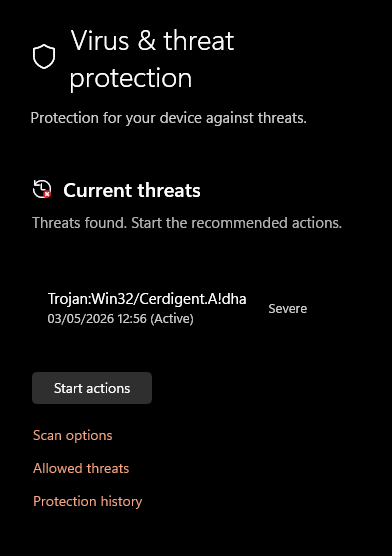
Before the update: clean scan, zero threats. After the update: two “severe trojans” in the root store. I tested this on five separate Windows machines. Every single one showed the exact same false positive after installing the same update.
This is not a subtle correlation. That is the definition of a bad signature in an AV update.
This shit is scary…
A false positive on a root certificate is not the same as a false positive on some random .exe. If a user panics and clicks Quarantine – which is exactly what Defender is prompting them to do – Windows removes the DigiCert root certificates from the trust store. From that point on, any website using a DigiCert-issued certificate will throw an SSL error. That is a huge chunk of the internet, including most banks and major services.
The correct action was to choose Allow on device, not Quarantine. But Defender labels the threat as Severe and the default action is Quarantine. Most users will not stop to investigate. They will click the big button.
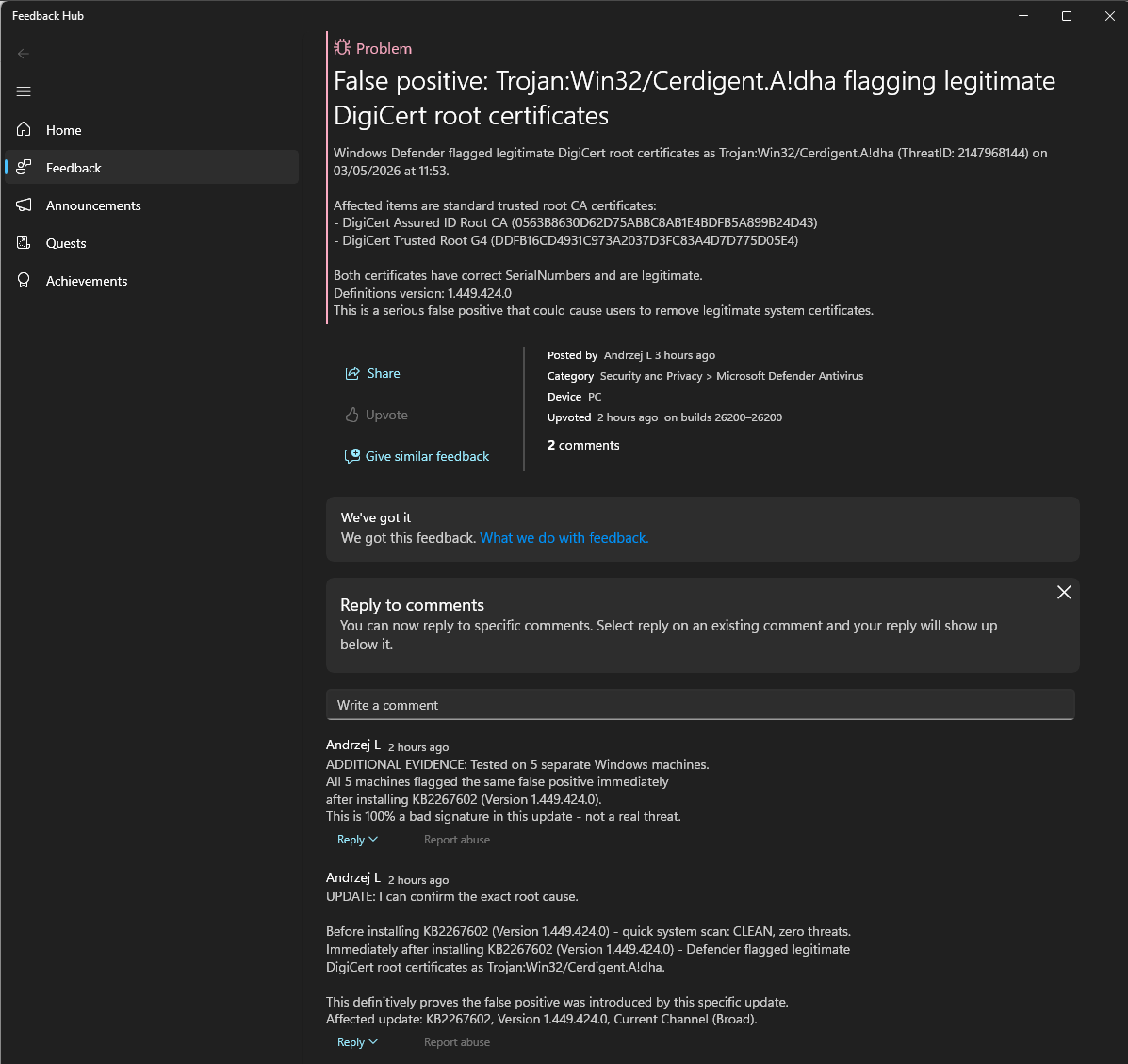
I documented everything – the PowerShell output, the exact certificate details, the update version – and submitted a report through the Windows Feedback Hub (Win + F, Security and Privacy, Microsoft Defender Antivirus), marking it as high severity with a security concern flag. The submission included:
- Screenshots from Defender
- Full PowerShell diagnostic output proving the certificates are legitimate
- Confirmation that the false positive appeared on five separate machines
- The exact update KB number and definition version that introduced the problem
The report can be found here: https://aka.ms/AA10ryqk
For those that cannot access it via the Feedback Hub:
When Defender screams at you, do not just click the default action and walk away – especially when root certificates are involved. Spend two minutes running diagnostics first. In this case, that two minutes meant the difference between a machine with intact HTTPS trust and one that would have thrown SSL errors on half the internet.
AV vendors ship bad signatures sometimes. It happens to all of them, Microsoft included. The right response is to verify before you act, document what you find, and report it. The more reports MS gets with hard evidence attached, the faster they pull the bad signature from the update pipeline.
And yes – the certificates were fine. The computer was clean. It was entirely Microsoft’s mistake, not mine… And if I am wrong… I am fucked. And not in a good way… 😉
Catch you on the flip side,
AndrzejL